Watching IPTV on iPhone Duo: Tabletop, Book and Open Layouts
A foldable iPhone changes how you watch. Open, it gives you room for a channel list and the player at the same time. Half folded on a table, it becomes a small stand-up screen. This guide explains how Smart IPTV Pro Player uses each iPhone Duo position for IPTV, and when each one is the best choice.
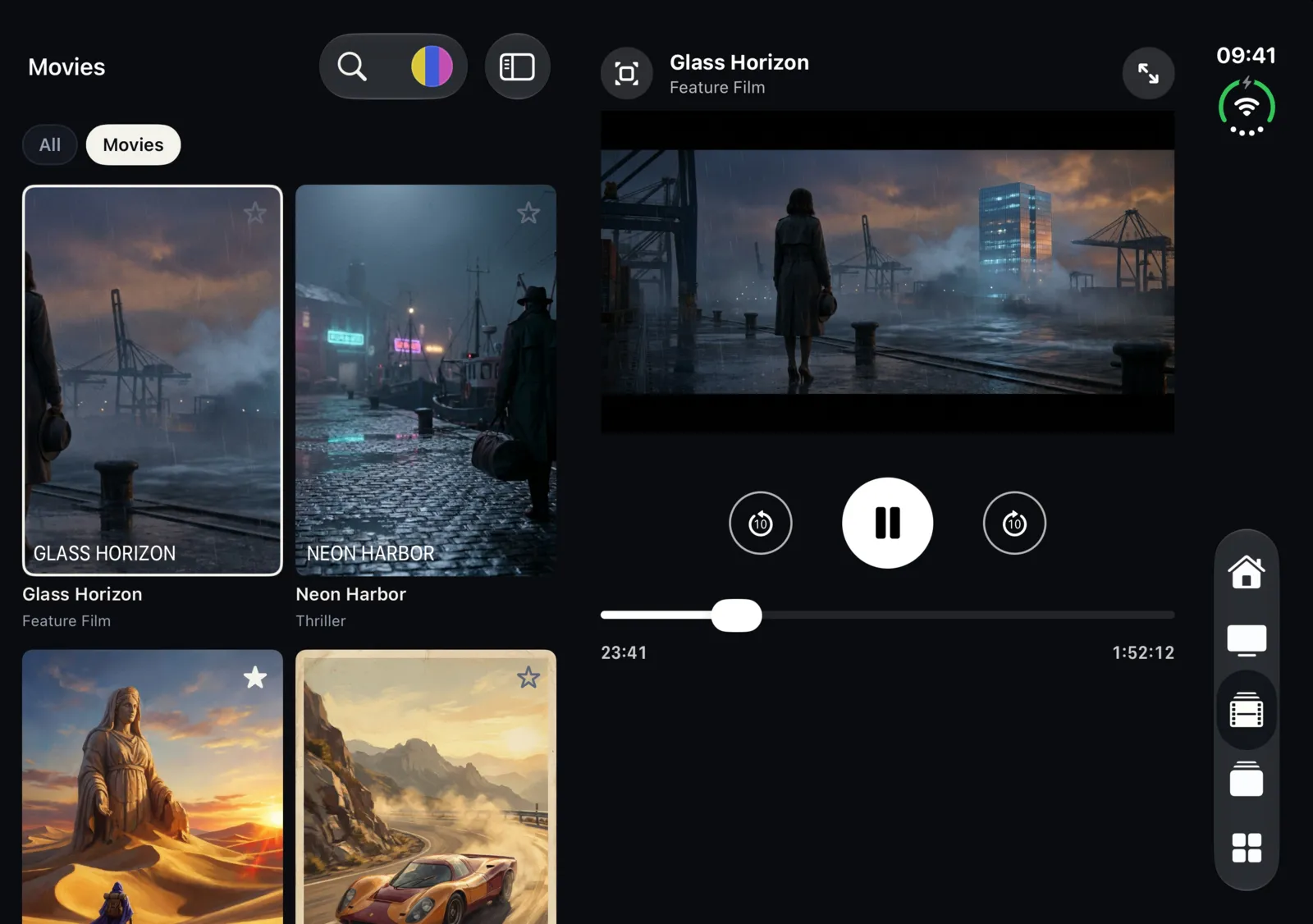
Same app, a layout for every fold
Smart IPTV Pro Player is one universal app for iPhone and iPad, and it adapts its layout to iPhone Duo. There is no separate version to download and nothing to switch on. When you fold or unfold the device, the app changes its layout automatically to fit the position you are holding it in.
Your playlists stay exactly the same in every position. The profiles you added with an M3U link or an Xtream Codes login, your favorites and your Continue watching row are all there whether the phone is open, half folded or closed. Only the arrangement on screen changes.
As with any device, the app is a player only. It includes no channels, playlists or IPTV service. You add a source from a provider you are authorized to use, and the Duo layouts simply give you more ways to watch it.
There are four positions to know about:
- Open: the inner display fully unfolded, with your list on one side and the player on the other.
- Tabletop: half folded and standing on a surface, with the video above the fold and the controls below.
- Book: half open and held like a book, with browsing on the left page and playback on the right.
- Closed: folded shut, using the outer display with the normal iPhone layout.
The images in this guide were captured in Apple’s iPhone Duo simulator using sample content.
Open: list and player side by side
When you unfold iPhone Duo completely, the inner display is wide enough for two panes. Smart IPTV Pro Player keeps your list on the left and opens the player on the right. The split sits on the fold, so neither the list nor the video is cut in half by the crease.
This is the layout for browsing and watching at the same time. In Live TV, you can keep the channel grid in view and tap from one channel to the next while the player keeps the right side of the screen. In Movies and Series, the poster grid stays on the left, so you can look through what else is in a category while something plays. The tab bar runs along the edge of the screen, so Home, Live TV, Movies, Series and Library are still one tap away.
The open layout is especially useful with a large playlist. Pick a section, narrow it with Categories, and you can sample several channels in a row without closing the player each time. When you find something worth keeping, tap the star to add it to your Favorites. For more on taming a long list, see how to organize a large IPTV playlist on iPhone.
When you want the picture alone, the player still offers a full-screen landscape view with the same controls: back and forward 10 seconds for movies and episodes, and next and previous channel for live TV.
Tabletop: picture up, controls down
Tabletop is the position for watching hands-free. Fold the phone partway and stand it on a table, a desk or a tray, with the lower half lying flat. Smart IPTV Pro Player puts the video in the upper half, facing you, and moves the controls below the fold.
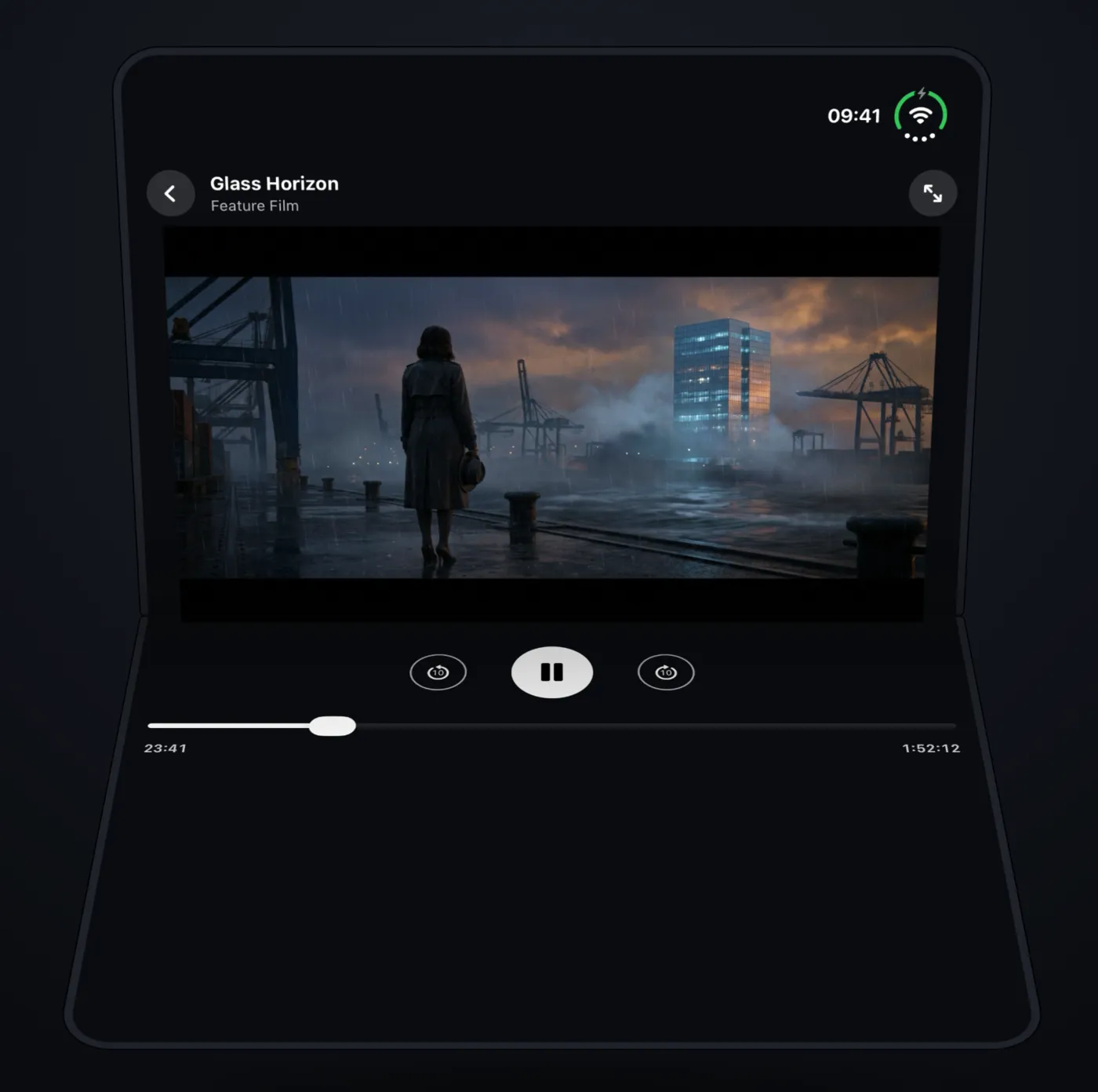
On the lower half you find pause and play, the skip buttons and the progress bar. Because these sit on the flat half, you can reach them without touching the upright screen, which keeps the phone steady and the picture free of fingerprints.
For live TV, the lower half also shows the channel list. That makes tabletop a practical way to keep the news or a match running during breakfast or while you work: the picture stays up, and switching channels is a tap on the flat half instead of a trip back through the menus.
A few tips for tabletop viewing:
- Use a stable, level surface and a fold angle that keeps the upper half facing you without tipping back.
- For long sessions, keep the phone on a charger if you can. Streaming video with the screen on uses battery steadily.
- If you watch on mobile data, remember that video adds up quickly. A smaller, everyday playlist and a stable Wi-Fi connection make a long tabletop session more comfortable.
If the stream stutters, the cause is almost always the connection or the source rather than the fold. Our guide to IPTV buffering and performance on iPhone walks through what to check.
Book: browse while you watch
Hold iPhone Duo half open, like a book, and the app treats the two halves as two pages. The left page shows Home or your channel grid, and the right page shows playback.
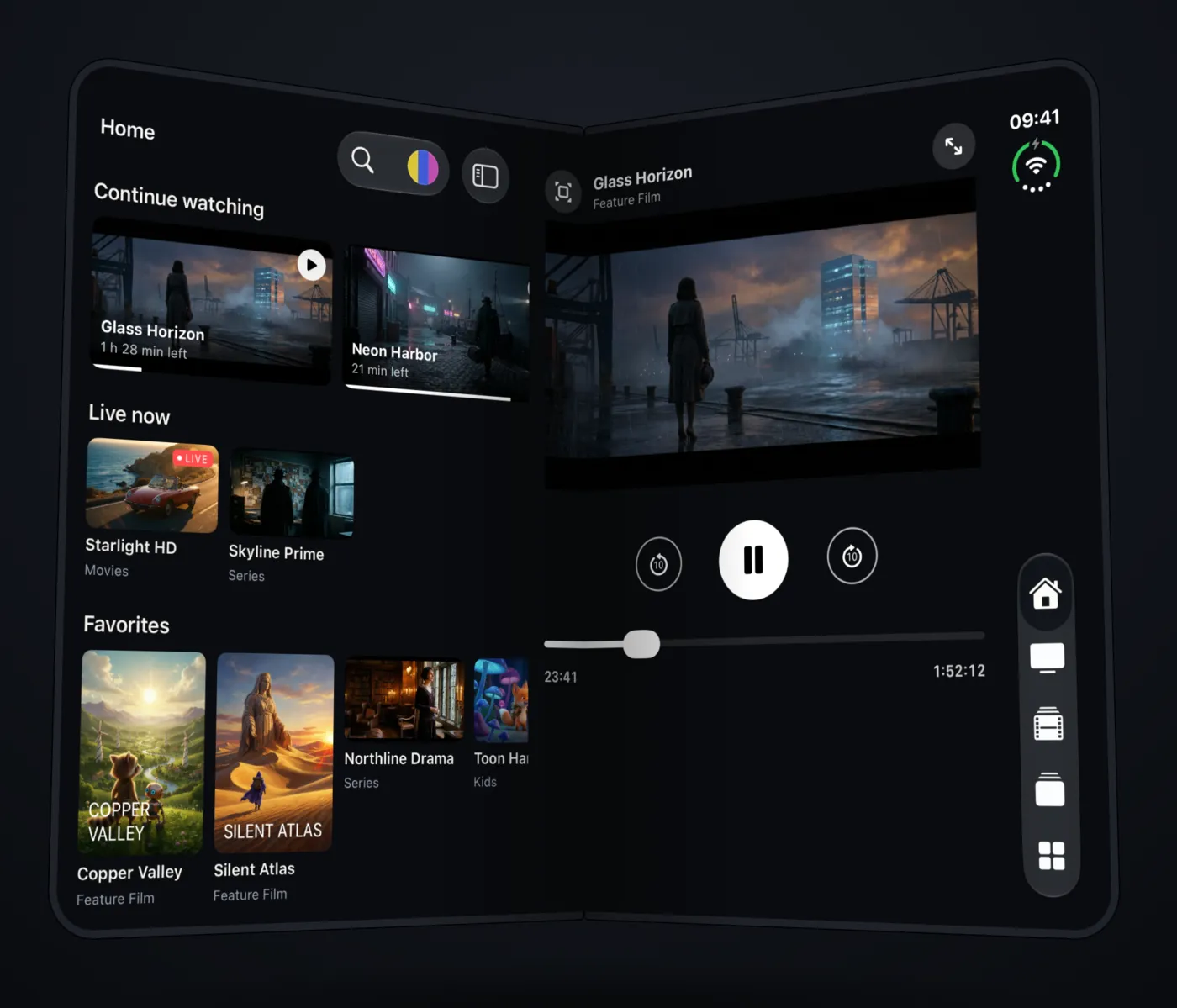
Book position suits the times you hold the phone in your hands rather than standing it up: on the sofa, in bed or on a train seat. Home on the left page gives you Continue watching and Live now, so you can pick up a film where you stopped or check what is on, while the right page keeps playing.
When you reopen a movie or episode you already started, the app asks “Continue from mm:ss?” and offers Resume or Start from Beginning. Combined with the list on the left page, that makes book position a comfortable way to work through a series one episode at a time.
Closed: the familiar iPhone layout
Fold iPhone Duo shut and the app moves to the outer display with the regular iPhone layout. The tab bar sits along the edge, within reach of your thumb, so you can browse one-handed, start a channel or check your Library without opening the phone.
Closed is the quickest way to do small things: check what is live, play a favorite, or start a film you will continue later on the larger inner display. Because the layouts share the same playlists and the same watch history, you can start closed and unfold whenever you want more room.
A simple routine works well for many people:
- Closed, on the move: open the app, check Live now or your Favorites, and start what you want.
- Open, when you sit down: unfold for the list-and-player layout and browse while you watch.
- Tabletop, when you put the phone down: stand it half folded and keep watching hands-free.
If you are setting up the app for the first time on iPhone Duo, add your source first. Our guides on adding an M3U playlist and setting up Xtream Codes apply unchanged, since the setup screens are the same on every iPhone.
Frequently asked questions
Do I need to turn on the iPhone Duo layouts?
No. The layouts switch automatically when you fold or unfold the device. There is nothing to set up in Settings.
Is there a separate app for iPhone Duo?
No. Smart IPTV Pro Player is one app for iPhone and iPad, and the same download adapts to iPhone Duo. It requires iOS 18.0 or later. Some features need a subscription; check the App Store and the purchase screen for current terms. If you also watch on a tablet, see IPTV on iPad.
Can I watch two channels at once on the two halves?
No. The two halves show a list or Home next to a single player. There is one stream at a time, and the extra space is used for browsing and controls.
Does the app include channels for iPhone Duo?
No. The app is a player only and includes no channels or IPTV service. You add an M3U link or Xtream Codes login from a provider you are authorized to use. If you are unsure about a service, read is IPTV legal.